A GA1 report is only useful if your team can find it, understand its findings and act on them. Keeping GA1 inspection records in scattered emails, equipment folders and site offices can make it harder to see what needs attention, even when the examination itself has been completed.
It’s understandable to want a straightforward answer to what records to keep and how to organise them. A consistent record for each item of lifting equipment can help managers follow examination findings, track actions and retrieve relevant documents during a review.
This guide explains a practical way to organise records by equipment, site and inspection date, maintain a clear history, and make follow-up actions easier to monitor. It also looks at how GA1 testing and wider safety oversight can support a reliable records process.
DL Safety provides GA1 testing and ongoing health and safety management through Monthly Safety Support Packages. To learn more, visit www.dlsafety.ie, email info@dlsafety.ie or call 085 8316885. DL Safety’s address is Unit 3D Thurles Business Center, Stradavoher, Thurles, County Tipperary, E41 W880.
Key Takeaways
- Treat each GA1 report and its associated evidence as part of that equipment item’s history, so findings are easier to follow and share.
- Use a consistent equipment identifier across the physical item, register and report to reduce filing mix-ups.
- Choose paper, digital or a hybrid system around how your team needs to access, search and update records.
- Make keeping GA1 inspection records manageable by reviewing reports regularly and tracking findings alongside follow-up evidence.
- Build a repeatable routine for filing, reviewing and retrieving records, with GA1 testing and wider safety support helping reinforce the process.
Why keeping GA1 inspection records matters beyond inspection day
A GA1 report has value after the examination is over, but it’s only one part of the information a team may need to manage lifting equipment. For practical record-keeping, treat the equipment history as a connected set of documents, not a single report saved for inspection day.
A GA1 record is the report of a particular thorough examination, together with supporting evidence that helps show what happened to that equipment before and after it. Keeping GA1 inspection records in an accessible, organised way makes it easier for managers and site teams to understand findings, check what action followed and share relevant information when responsibilities change.
What does a GA1 record help a site manager establish?
The report should be connected clearly to the equipment item and the examination event it describes. A consistent identifier, such as the asset reference already used in the equipment register, can help distinguish similar items and reduce the risk of filing a report against the wrong one.
A report records the examiner’s findings at the time of examination. It isn’t proof of the equipment’s condition after that date, and it shouldn’t be treated as a guarantee of ongoing safety. Accessible records support oversight and informed decisions, but paperwork alone doesn’t make equipment safe. Teams still need to respond to findings and pay attention to changes or concerns between examinations.
Which documents belong in the equipment history?
The GA1 report is the central examination record. Other useful documents can sit alongside it as separate supporting records, helping a manager follow the equipment’s history without confusing one type of evidence with another. For example, a repair note explains work carried out, whilst a follow-up record can show how a reported issue was addressed.
Keep the distinction clear:
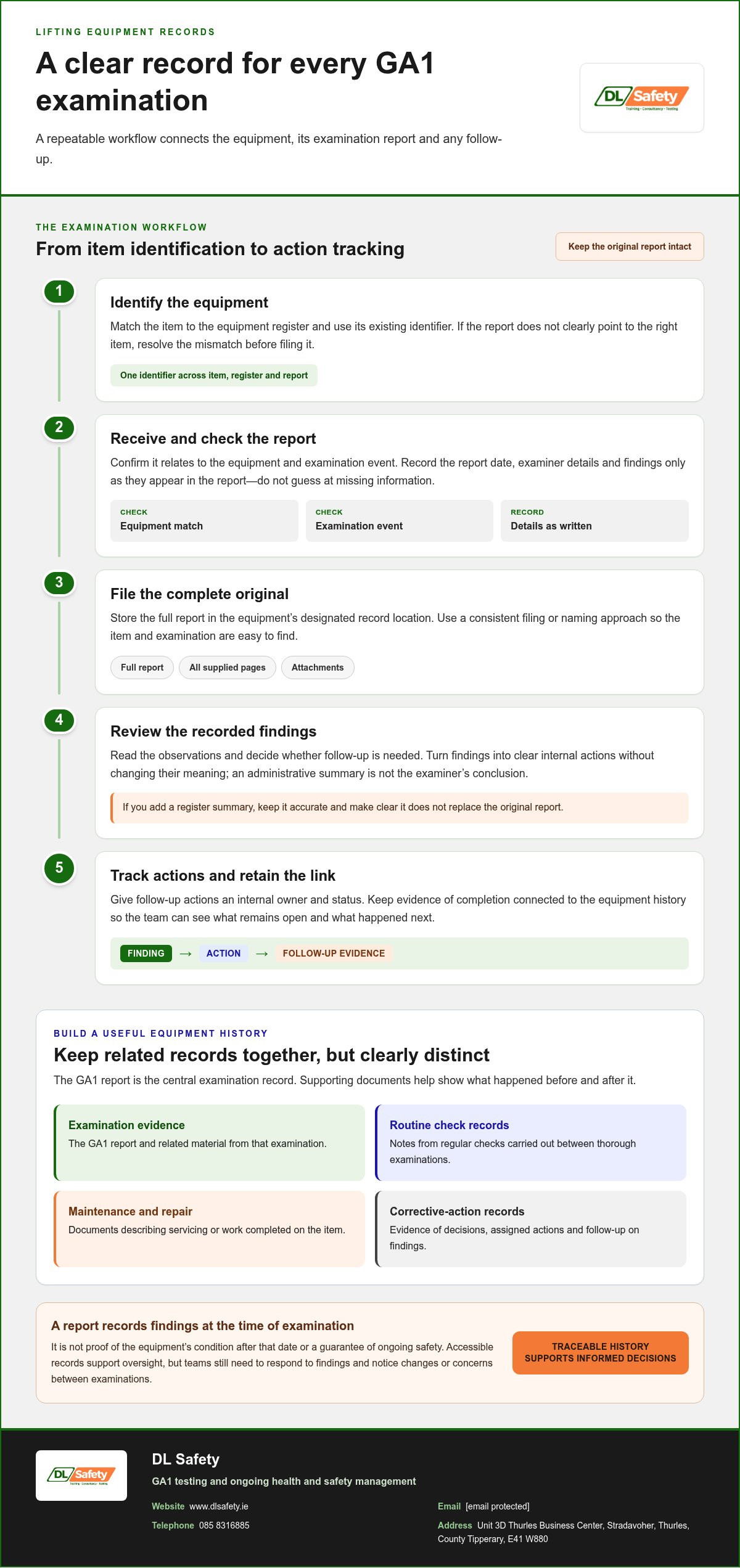
- Examination evidence: the GA1 report and any related material from that examination.
- Routine check records: notes from regular checks carried out between thorough examinations.
- Maintenance and repair records: documents describing servicing or work completed on the item.
- Corrective-action records: evidence of decisions, assigned actions and follow-up on examination findings.
These categories are a practical way to build a useful equipment history; they should not be presented as a list of legally required documents unless a specific requirement has been verified. The wider Occupational Safety and Health context is about managing workplace risks, but a general overview doesn’t establish Irish requirements for a particular lifting item.
Clear separation also helps prevent a routine check or repair note from being mistaken for a thorough examination report. The aim is a traceable history: a team member can identify the item, locate the relevant examination evidence, understand any recorded finding and find supporting information about what happened next.
How to build a reliable GA1 record for each item of lifting equipment
A dependable record begins with a clear link between the physical item, its register entry and the examination report. Keep the process consistent each time a report arrives, so staff can trace the document and see what needs attention without relying on memory or searching through unrelated files.
Match every GA1 report to the correct equipment
Use an existing unique equipment identifier wherever possible, and keep it consistent across the register, report and maintenance documentation. A consistent equipment identifier makes an examination record traceable by linking the report to the right physical item and its history. There’s no need to assume one identifier format is legally prescribed: the practical aim is an unambiguous match that your team can use reliably.
Record findings and follow-up without losing the audit trail
Keep the original report intact. If you add a short summary to a register or tracking system, accurately reflect the examiner’s recorded findings and make clear that the summary isn’t a replacement for the report. Assigning an internal owner and status to follow-up actions is a management practice that helps teams see what remains open and where evidence of completion is filed.
Use this workflow for each examination:
- Identify the equipment. Check the item against the equipment register and use its existing identifier. If it isn’t clear which item the report refers to, resolve the mismatch before filing it as a record for that item.
- Receive and check the report. Confirm that the document corresponds to the equipment and examination event. Record the report date, examiner details and findings only as they appear in the report; don’t guess at missing information or turn a management note into a formal report field.
- File the original report. Store it in the equipment’s designated record location, using a consistent naming or filing approach that makes the item and examination easy to find. Keep the full report, including any pages or attachments supplied with it.
- Review the findings. Read the recorded observations and identify whether follow-up is needed. Translate findings into clear internal actions without changing their meaning, and avoid treating an administrative summary as the examiner’s conclusion.
- Track actions and retain the link. Note an appropriate internal owner and current status as part of your management process. When action is completed, file relevant evidence with, or cross-reference it to, the same equipment history so the report and response remain connected.
For example, if a report identifies an observation requiring attention, the register can point to the original report and show who is coordinating the response and whether supporting evidence has been added. This creates a clearer handover between managers and site teams, particularly when the person filing the report isn’t the person arranging follow-up.
A consistent approach to keeping GA1 inspection records also helps reveal gaps, such as a report that has no clear equipment match or an action with no recorded status. DL Safety’s GA1 testing can support a more consistent examination and records process.
Paper or digital GA1 records: which system suits your site?
The right filing method depends on how your team works. A paper folder may be simple for staff who need documents beside equipment, whilst digital storage can make records easier to search and share. Neither option helps if people don’t know where the current report is kept or use inconsistent filing habits. Choose a system your staff can maintain and retrieve reliably.
Compare the practical trade-offs before settling on an approach:
| Consideration | Paper files | Digital records |
|---|---|---|
| Access | Useful where a physical file is kept close to the equipment or site office. | Can support shared access for staff who have permission and suitable system access. |
| Searchability | Depends on clear labels, an index and filing discipline. | Search by equipment identifier or other recorded details, if files are named consistently. |
| Updating | New documents can be added to the relevant folder, but updates rely on staff filing them there. | Reports and linked notes can be added centrally, with a clear approach to versions. |
| Backup | A physical copy can be vulnerable to loss or damage at its storage location. | Backups can support recovery, provided they’re maintained and can be accessed when needed. |
When paper files can work well
Paper can suit a small operation where staff know the filing location and equipment stays at one site. File by equipment identifier, or use clearly labelled equipment groups with a straightforward index showing where each record belongs. The index should help users locate the current report, rather than leaving them to search several folders. Separate site files can become isolated when managers or teams need records held elsewhere.
When digital records improve retrieval
Digital storage can make it easier to search reports, share access and link documents to an equipment register. Use permissions suited to staff roles, keep a backup routine and make clear which version is current. Retain readable source reports, and avoid overwriting an original file without a traceable record of the change. These are sensible operational controls for reliable record management, not a statement of a specific legal mandate.
A consistent naming convention can make either system easier to use. For example, a team might name a file using the equipment identifier and the report date, then apply that same pattern each time a new report is filed. The exact convention matters less than using it consistently and ensuring staff understand it.
A hybrid approach may work well if staff need a physical copy on site as well as shared retrieval. Decide which version is the controlled source, who updates it and how the other copy stays current. Without those simple rules, hybrid filing can create duplicate or conflicting records.
For keeping GA1 inspection records, the best system is the one people can follow even during a busy shift: clear filing, sensible access and a dependable way to find the right report.
How to review GA1 records, manage findings and prepare for retrieval
A record system needs occasional attention to stay useful. A report may be filed correctly on the day it arrives, yet become difficult to rely on if equipment changes, follow-up is left unclear or documents aren’t checked again. Set an internal review rhythm that suits the size of your equipment register, how it’s managed and how often records change. This is a management practice, not a prescribed review interval.
A practical review routine for site and safety teams
Use a planned review to compare the equipment register with the reports on file. Look for items with no report in the record system, reports that appear linked to the wrong item, and documents that are difficult to read or incomplete as stored. Record any gaps for follow-up through your organisation’s normal process rather than assuming the review itself resolves them.
Then check recorded findings against internal action tracking. An action should have an owner and a clear status, such as open, in progress or completed, if those labels fit your process. Keep a note of the review date and unresolved issues so the next review can pick up where the previous one ended. Where there’s no follow-up evidence, identify what information is needed and who will locate or provide it.
What to have ready when records are requested
Prepare a retrieval pack for the specific equipment or examination in question, rather than gathering every document held by the business. The request may have a defined scope, so first understand what item, period or evidence is being sought. Assemble the equipment record and original GA1 report, then include related action evidence if it helps explain how a recorded finding was handled.
A useful pack might include:
- The relevant equipment-register entry or identifier, to show which item the report concerns.
- The original GA1 report, kept legible and complete as received.
- Relevant follow-up evidence, such as a record of action taken that clarifies the response to a finding.
- A brief note identifying any outstanding issue or record gap, where this helps explain the status of the file.
Keep the pack focused and distinguish the examination report from supporting documents. Reviewers may request different information, so don’t assume one standard set will suit every internal or external review. A clear index or contents note can help someone unfamiliar with the filing system find the source documents without mistaking a summary for the original evidence.
Record retention periods and any legal requirements should be checked against current authoritative guidance relevant to the equipment and circumstances. Don’t treat an internal filing preference as a legal rule. For further examination context, see the GA1 testing guide.
Regular review makes keeping GA1 inspection records an active part of equipment oversight, rather than a search exercise when a document is requested. For practical support with GA1 testing and a consistent records process, DL Safety can help connect examination activity with wider safety management.
Make GA1 record-keeping part of a consistent safety support system
Useful records are built through repeatable habits, not a last-minute search. Identify each item of lifting equipment clearly, file its examination report against the right item, review any findings and track follow-up through to a recorded outcome. When the same approach is used across the equipment register, teams can see how examination information fits into wider safety oversight.
Keeping GA1 inspection records is one part of that process. The report provides evidence of an examination event; your organisation’s filing and follow-up practices help keep that evidence connected to the equipment history. Clear ownership also matters. Staff should know who updates the record, who monitors actions and where the original documentation is kept.
Where professional GA1 support fits into record management
Professional GA1 testing can provide examination documentation for the business to organise and manage. Once a report is received, the organisation can link it to the relevant equipment record and use its established process to review findings and coordinate any follow-up. Testing and record management are connected, but they’re distinct parts of the overall process.
DL Safety provides GA1 testing, whilst its Monthly Safety Support Packages provide ongoing health and safety management and compliance support. This broader support can help businesses bring equipment records into a more consistent approach to safety oversight, alongside their other internal processes. The monthly safety support guide explains how ongoing support can fit into a business’s wider safety arrangements.
Choose a clear next step for your organisation
Start by identifying where your current process is least reliable. Perhaps reports arrive but aren’t matched to the equipment register, findings lack clear follow-up, or staff aren’t sure where to retrieve the original documents. A defined improvement to that step can make the record system easier to use without requiring a complete overhaul.
From there, agree who maintains the records and how the process connects with GA1 testing and wider safety oversight. A practical arrangement should fit the way your organisation manages equipment, documents and actions, rather than adding unnecessary steps. No filing process can replace the examination itself or guarantee a particular compliance outcome, but a consistent system helps teams understand what evidence they hold and what still needs attention.
DL Safety can discuss your GA1 testing or ongoing safety support requirements. Visit www.dlsafety.ie, email info@dlsafety.ie or call 085 8316885. The address is Unit 3D Thurles Business Center, Stradavoher, Thurles, County Tipperary, E41 W880. Get in touch to discuss a practical next step for your equipment records and safety support.
Make your next records improvement count
Choose one practical improvement your team can put into use now. You might clarify who updates the equipment register, agree how unresolved findings are escalated, or make sure the right staff know where to retrieve a report. A small, clearly owned change can help turn keeping GA1 inspection records into an everyday part of equipment oversight, rather than a task that slips until documents are needed.
From there, consider whether your current GA1 testing and wider safety support fit the way your business manages equipment and follow-up. A practical conversation can help you identify a sensible next step for your records process and ongoing safety arrangements.
Discuss GA1 testing and practical safety support with DL Safety. With a clear process and the right support around it, your team can build confidence in how records are managed and put findings into action.
Frequently Asked Questions
How long should a business keep GA1 inspection records in Ireland?
There isn’t a retention period I can state as a universal rule for every GA1 record. Check current authoritative Irish guidance for requirements that apply to your equipment and circumstances before setting a retention schedule. As a practical records-management measure, consider whether older reports are needed to understand the equipment’s history or follow previous findings, and document your organisation’s reasons for its chosen approach.
What information should a GA1 inspection record contain?
Keep the complete report as received, including the information the examiner recorded about the item, examination and findings. The precise content may depend on the report format, so don’t add assumed mandatory fields or treat an internal summary as a substitute for the original. Your filing index can include a reference to locate the report, but distinguish that administrative information from details recorded by the examiner.
Can GA1 inspection records be kept digitally?
Yes, a business can use digital storage as its record-keeping method. Keep the report readable and retrievable, restrict editing or access where appropriate, and maintain backups as sensible operational safeguards. For example, a team might store the source report against the equipment’s register entry and make it available to staff who need it. Digital storage is only useful if staff know how to locate the correct file.
Who should be responsible for maintaining GA1 records?
Assign responsibility to a named role or person who can keep the equipment register and reports aligned. That person may coordinate filing and flag missing documents, while a manager or designated colleague oversees follow-up on findings. Set out who takes over during absence or staff changes, too. A clear handover prevents records from depending on one person’s inbox or memory and helps keep ownership visible.
What should a business do if a GA1 report records a defect?
Read the report carefully and follow the examiner’s recorded advice and your organisation’s safety procedures. Make sure the relevant person is informed, clarify any point that isn’t understood, and record who is managing the response. Keep evidence of actions taken with the equipment’s records. Don’t assume a defect has been resolved simply because it was noted, or that a brief internal summary changes the examiner’s finding.
Does a GA1 report replace routine equipment checks or maintenance records?
No. A GA1 report relates to a thorough examination at a particular time; it doesn’t document every check, service or repair that takes place separately. For example, if a user notices a concern during routine work after an examination, that concern and any response belong in the relevant internal process, rather than being added retrospectively as though they were part of the GA1 report.
How can a site manager find a GA1 report quickly?
Make the equipment register the starting point: use its identifier to locate the corresponding report, then test the process by asking someone unfamiliar with the filing system to find a sample record. If they need help, improve the index, file labels or staff instructions. Keeping GA1 inspection records easy to retrieve depends on a clear route from the item or register entry to the original document.