
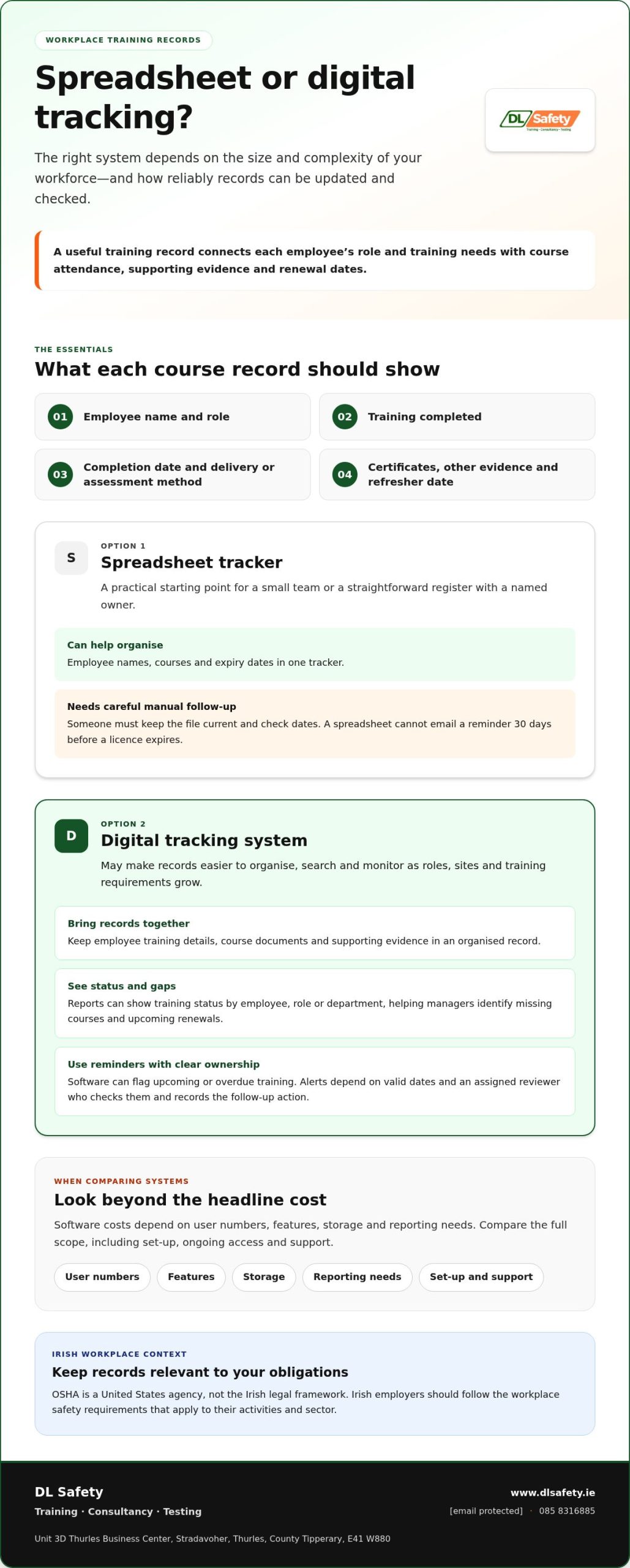
A training record is useful only when it shows who completed which course, when it took place, and when refresher training is due. To understand how to track employee safety training records, use a consistent register that links each employee’s role and training needs to attendance details, certificates or other evidence, and renewal dates.
A spreadsheet can be a practical starting point for a small team. As roles, sites and training requirements grow, however, keeping records current and finding evidence for an audit can take more time. A digital system can make records easier to organise, search and monitor, while spreadsheets rely on careful updates and follow-up.
This guide explains which Irish industries can benefit from tracking, what information to record, and how to maintain and audit training files. It also compares spreadsheets with digital tracking and clarifies how records support workplace compliance. OSHA is a United States agency, so Irish employers should focus on the requirements that apply in Ireland rather than treating OSHA rules as Irish law.
Key Takeaways
- Match training requirements to each role, task and workplace hazard so gaps are easier to spot.
- Keep attendance, completion dates, refresher needs and supporting evidence together for clearer audit preparation.
- Use a training matrix to organise requirements, then choose a spreadsheet or digital system that suits the scale and complexity of your workforce.
- Digital tracking can help managers identify overdue or expiring qualifications and plan follow-up training.
- OSHA is a United States agency; Irish employers should apply the requirements relevant to their own workplace and sector.
How does safety training tracking help with OSHA compliance?
OSHA is the United States workplace safety agency, not the Irish legal framework. In Ireland, employers should keep training records relevant to their workplace safety obligations and sector requirements.
Digital compliance recordkeeping
A digital system brings employee training details, course documents and supporting evidence into one organised record. For each course, capture the employee’s name, training completed, completion date, delivery or assessment method, and any refresher requirement. For example, a new machine operator’s record can link their role to relevant training materials and assessment evidence. Choose a system that stores these details consistently and produces clear reports.
On-demand status and gap reporting
On-demand reports let managers view training status by employee, role or department without assembling separate files. Set requirements by role, then compare assigned courses with completed records to identify missing training and upcoming renewals. A dashboard can flag overdue courses, while a report can show which team needs follow-up. This helps safety leads prioritise gaps and document the action taken.
Benefits for safety, compliance and HR teams
Safety teams can use completion records to identify tasks or workplace hazards that may require more training. HR teams can match training evidence to employee records, while operations managers can check whether staff have completed relevant courses before assigning work. Compliance staff can retrieve documents and reports for an audit or investigation. A shared system also reduces repeated data entry, provided responsibilities for updating records are clear.
Irish employers should follow the workplace safety rules that apply to their activities, not treat OSHA requirements as Irish law. OSHA guidance describes records that identify who received training, when it was completed and how it was delivered or assessed. These fields can also help Irish organisations organise evidence, alongside the requirements that apply locally.
Software costs depend on factors such as user numbers, features, storage and reporting needs. Compare the full scope of each system, including setup, ongoing access and support, rather than judging cost by a single headline figure.
Missing or inaccurate records can make it harder to demonstrate that workers received suitable training. If an employer fails to meet applicable obligations, enforcement consequences may follow. Incomplete documents can also make audits and investigations harder to manage.
Track completion and pass rates separately: completion shows who finished a course, while assessment results show who met its learning criteria. To assess return on investment, compare system and training costs with measurable operational outcomes, such as less time spent chasing records or fewer repeated training sessions. Decide on the measures before implementation so later reports allow a meaningful comparison.
What Industries Benefit From Tracking Safety Training Records ?
Industries benefit from tracking when workers have different training needs by role, task, site or workplace hazard. In Ireland, a construction firm, quarry, factory, transport operator or healthcare organisation can use records to see which qualifications staff hold and when they need renewal. This helps supervisors match training status to planned work instead of relying on memory or scattered certificates.
Construction, quarrying and manufacturing
On a construction site, requirements may differ between a general operative, plant operator and lifting team member. A quarry can track training against vehicle, equipment and site tasks, while a manufacturer can organise records by machinery and production area. Set up the tracker by role, record qualifications and expiry dates, then assign responsibility for reviewing upcoming renewals. This helps identify missing records before work is allocated.
Transport, logistics and field teams
For transport and logistics teams, staff may work across shifts, depots or customer locations. A central training matrix can help supervisors see which employees have completed role-relevant courses, even when teams don’t share the same schedule. Record each worker’s role and training status, then filter by depot, shift or task. Training management software can send reminders for upcoming or overdue safety training, helping managers plan follow-up rather than discover gaps during a busy shift.
Automated reminders and expiry notifications
Software can flag qualifications approaching expiry and notify the responsible supervisor, provided each employee record includes a valid date and an assigned reviewer. For example, an upcoming-expiry alert can prompt a manager to schedule refresher training before assigning a worker to the relevant task. Reminders are useful only when someone owns the follow-up: assign a recipient, review outstanding alerts and record the action taken.
Spreadsheets can help smaller teams organise names, courses and expiry dates, but they rely on someone checking and updating the file. A spreadsheet tracker cannot email a reminder 30 days before a licence expires. As staff numbers, locations or qualification types increase, that manual follow-up can become harder to manage. A digital system can make reminders and status views more consistent, whilst a spreadsheet may suit a straightforward register with a named owner.
Set notifications around the work, not just the calendar. A factory training matrix may need to separate employees by machinery or production area, while a field team may need a view by location and supervisor. Review upcoming expiry alerts at regular planning meetings, assign each gap to a responsible person, and update the record when training is complete. This connects reminders to a clear next step and keeps qualification status accurate.
Across sectors, the process is consistent: map training needs to roles, enter evidence and expiry dates, and use reminders to prompt timely review. The best tracker is one supervisors can keep current and use to make informed work-allocation decisions.
Centralised digital safety training records
A central management system brings training records, evidence and forms into one searchable place. Set it up around employee roles, courses and the documents that demonstrate completion.
Centralised digital record storage
A centralised system can connect each employee’s record with course details, certificates, assessment evidence and refresher dates. For example, a supervisor can find an employee’s completed training without searching separate paper files. Searchable digital records help teams retrieve information during an audit or internal review.
Training record management systems, learning management systems, digital safety forms and training matrices support different tasks. A training matrix maps requirements to roles; an LMS can assign courses and track completion. Industry resources such as westnetlearning.com explore how modern enterprise learning platforms automate tracking and delivery. Before choosing a system, map how records move from course attendance to evidence storage, then identify the reports managers need. This simplifies recordkeeping without losing useful detail.
Digitising employee training records
Start by sorting paper records and spreadsheets by employee, course and date. Enter current details into consistent digital fields, then attach certificates or assessment documents to the relevant record. A staged transfer lets the team compare a sample of digitised entries with original files before replacing manual registers. Keep source documents organised until the comparison is complete.
Cloud-based learning systems can store training materials and records, making them accessible to authorised users with an internet connection. For teams spread across sites, this can make it easier to use consistent course materials and record formats. Agree naming conventions first, such as employee name, course title and completion date, so files are easy to find.
Digital forms and templates can standardise how attendance, assessment results and follow-up actions are recorded. A form for a face-to-face course might capture the session, attendees, trainer and assessment outcome. When a regulatory or internal form changes, an online template can be amended without reprinting paper copies. Assign someone to manage the current template and remove outdated versions from everyday use.
Before moving more records, check how the system handles incomplete entries, supporting documents and reporting. Test whether a manager can find a certificate from an employee record and produce a course-completion report. Clear access arrangements and consistent fields help prevent duplicate files. A defined review process also keeps digital records aligned with current training materials and forms.
Digital systems can replace manual spreadsheets and paper records with a central place to assign, monitor and document training. Build the system around how employees, courses and evidence connect before importing records.
Spreadsheet-based training trackers and their limitations
A spreadsheet can be a manageable starting point for a small business or start-up, if its structure is clear and someone is responsible for updates. Treat training management as a repeatable process: record requirements, completion evidence and expiry dates, then review the register when roles or work locations change.
Build a training matrix with roles down one side and relevant courses across the other. Add work location or hazard where requirements differ, then mark each employee’s status against their role. For example, a matrix might separate site-based plant operators from office staff. This makes mandatory training needs easier to spot than relying on one generic list.
For contractors, temporary workers and remote employees, create a record for each person and connect it to their role, work location, required training and supporting evidence. Let supervisors review relevant status before assigning work, and update the record when someone changes role or finishes an assignment.
Project-based and scenario-based assessments can show whether someone can apply course learning to a particular task. Record the assessment type, result and follow-up action alongside the training entry. For example, a project team could document an assessment linked to its work procedure and note any further instruction needed. This adds context beyond a simple completed or incomplete status.
Spreadsheets become harder to control as records, editors and locations increase. A changed cell can overwrite an expiry date, inconsistent course names can split one course across several reports, and separate copies can quickly diverge. A spreadsheet also cannot email a reminder 30 days before a licence expires. Assign one owner, restrict editing where possible, and agree a naming convention to reduce avoidable errors.
Cloud-based servers with backups can let authorised staff access training information remotely through an internet connection. This can help supervisors working across sites or shifts, especially when records need review away from the main office. Store files in a controlled location, set consistent permissions and link certificates to the relevant employee record. An LMS can store training materials and records securely in the cloud.
Choose a format that suits the complexity of your register. A small team with stable roles may manage well with a carefully maintained spreadsheet; varied tasks, sites and expiry dates can make a digital system more practical. Check whether the tracker can show current status by employee, role and location, and whether someone can correct errors promptly.
Maintaining and auditing workplace training records
Reliable records need routine updates, clear ownership and periodic review. A structured audit can identify missing evidence, outdated qualifications and training gaps before records are needed.
Employee training record information
For each worker, record their name, role, training course, attendance, completion date and duration. Add expiry dates or renewal frequency where relevant, then link certificates, licences, assessment results and sign-offs. Identify the course or regulation and include an applicable reference or code. These details connect each record to the right person, task and qualification.
Keep the materials used in health and safety training, such as presentations, handouts, videos or online modules. Where a role requires a specific qualification, retain the worker’s certificate, licence or other relevant document. Record the trainer’s name and retain relevant evidence of external trainers’ qualifications or expertise. An assessment record, for example, can show whether a worker demonstrated understanding, not just attendance.
Record maintenance and audits
Assign someone to update records after each session and check entries for missing fields. Standardise course names, file formats and storage locations across the workplace so audits don’t uncover duplicate titles or scattered evidence. A reminder set before an expiry date can prompt a review. Historical records can also show who was competent at the time and when retraining became due.
Use a repeatable audit process. Compare the training matrix with employee records, check that evidence is attached, and follow up on expired or incomplete entries. Record the reviewer, review date and corrective action, such as booking refresher training or locating a missing certificate. Keep incident, accident and near-miss records with relevant details and actions taken; they can help identify where further training may be needed.
Training assessments and evaluations provide evidence of workers’ understanding and competency. Record the outcome and any follow-up, then connect it to the course entry. Review records against the requirements that apply to the workplace and industry. When a business has many employees to track, automating record management can help organise updates and reporting.
For an audit-ready record, check that each entry answers three practical questions: who was trained, what evidence supports it, and when is review due? This simple review helps teams spot gaps and assign clear next steps. To discuss workplace safety support and audit preparation, get in touch with DL Safety.
DL Safety: Monthly Safety Support Packages
DL Safety’s Monthly Safety Support Packages offer organisations a practical route to discuss ongoing safety support alongside training records. Lift Plans, GA1 Testing and Accident Investigation are also available for specific workplace needs.
To discuss your requirements, email info@dlsafety.ie or call 085 8316885. DL Safety operates nationally across Ireland to support businesses nationwide with comprehensive safety management.
Share your recordkeeping approach and support needs when you contact DL Safety, so the conversation can focus on practical help for your organisation.
Make your next step a workable routine
Make recordkeeping a routine people can follow, not a one-off tidy-up. Decide who updates records, where evidence is stored and how managers review outstanding actions. A small pilot with one team can reveal practical issues, such as unclear course names or missing ownership, before the process is used more widely.
Tracking employee safety training records is easier when the process fits real work patterns. Set a review point that works for your organisation, then adjust the workflow as roles, sites or training needs change. Keep the process clear so supervisors and workers understand their part.
If you’d like support with your workplace safety arrangements, contact DL Safety to discuss the next step. A consistent approach can help your team build confidence in its records and keep improving its process.
Frequently Asked Questions
Why are spreadsheets not suitable for managing OSHA training records?
Spreadsheets can record OSHA training, but they depend on people entering and checking information consistently. A copied file may become outdated, an edited cell can remove evidence, and reminders may not be automatic. For a US employer, records should show who received training, when it happened and how it was delivered or assessed. A spreadsheet may suit a small register, while complex requirements can call for stronger controls.
How do you audit staff training?
Audit staff training by comparing the current training matrix with employee records and supporting evidence. Select a sample of workers across roles or locations, then check course entries against attendance lists, certificates and assessment results. Record discrepancies, assign someone to resolve each one, and note the outcome. If a certificate is missing, for example, document whether it was retrieved or the employee needs reassessment.
How do you maintain training records in the workplace?
Maintain records through a defined update process: the person responsible for each training session submits attendance and evidence, and a record owner checks entries for completeness. Use consistent course titles and employee identifiers so transfers or name changes don’t create duplicate files. Log corrections with the date and reason, and review access permissions when staff change roles or leave the organisation.
How many years must training records be kept?
There is no single retention period that applies to every workplace training record. The required period depends on the record type and applicable Irish legal or sector requirements. Set a retention schedule that identifies each document category, its governing requirement and the event that starts retention, such as course completion or employment ending. Keep the schedule with your records procedure and apply it consistently when archiving or disposing of files.
Which employee training tracking method is best for a small business with limited resources?
A spreadsheet can suit a small business with stable roles, a limited range of courses and a named person responsible for updates. Use a protected master file rather than several local copies, and review it during routine planning. If staff work across sites, qualifications vary by task or expiry follow-up becomes difficult, compare a training matrix or learning management system. Choose based on what will keep records accurate.
How do you create and maintain a safety training record for each employee?
A practical way to track employee safety training records is to create a file for each worker using a consistent employee identifier. Add their role, course title, completion date, attendance and assessment outcome, then attach relevant certificates or sign-offs. When a worker changes roles, for example, review the record against their new duties. Update it after each session and log corrections rather than silently replacing information.
What are the best tools or software for tracking employee safety training?
The best tool depends on how training is assigned and evidenced. A spreadsheet provides a simple register; a training matrix maps courses to roles; an LMS can assign courses and produce completion reports. Before selecting software, test a typical task: find a worker’s record, locate its evidence and report outstanding training for a team. Check that the system supports your record structure and that staff know who updates it.
How do you track training completion, expiry dates and refresher training?
To track employee safety training records over time, give each course a status, completion date and applicable expiry or review date. Use a calendar or system reminder to prompt review, then assign an owner to arrange refresher training and file the evidence. Distinguish “assigned”, “completed” and “assessed” so an invitation isn’t mistaken for competency. Review overdue items with the supervisor and record the follow-up action.